

If you own a Samsung Galaxy phone, you probably know about Good Lock Samsung’s little treasure chest of customization tools that lets you tweak almost every part of your device. From changing how multitasking works to redesigning the lock screen, Good Lock makes your Galaxy feel yours.
But here’s the catch: Samsung keeps it locked down. Depending on where you live or which model you have, you might not even get access to it at all. And honestly? That sucks.
Enter BadLock the app that fixes what Samsung never did.
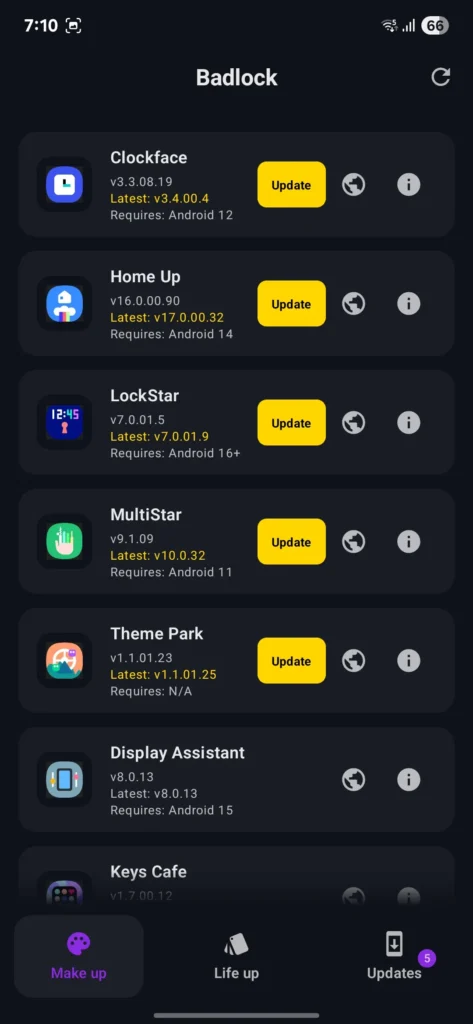
So, What Exactly Is BadLock?
Think of BadLock as Good Lock’s cooler, more open cousin. It’s not just a copy it’s a full reimagining of how you should be able to manage all those powerful customization modules.
Built with modern Android design BadLock feels smooth, fast, and fresh. You open it, and boom it just works. No waiting, no fuss, no feeling like you’re stuck behind Samsung’s regional walls.
Why People Are Loving BadLock
Here’s where it shines:
✨ No Restrictions – Doesn’t matter where you live or what Galaxy you have, BadLock lets you use the modules Samsung hides from you.
⚡ Instant Loading – The app fires up instantly. Even if you’re offline, it loads cached data while quietly refreshing in the background.
🔄 Smart Updates – No more manually checking. BadLock pulls updates straight from APKMirror’s official feed and tells you what’s new, right in the app.
🌙 Modern UI – It’s designed for one-handed use, has a slick dark theme, and feels futuristic compared to Samsung’s clunky original.
🎯 Performance First – Scrolling at 120Hz feels buttery smooth, just like your Galaxy flagship.
🔔 Updates Hub – A neat little tab shows you which modules have updates waiting. No hunting, no guessing.
Download the BadLock APK
Go to Github
Why This Matters
Samsung’s Good Lock has always been amazing but frustrating. It’s like they built this awesome playground and then put up a “locals only” sign.
BadLock tears that sign down. It gives you the full Good Lock experience, anywhere in the world, on almost any Galaxy phone. And honestly? It feels more polished and user-friendly than the original.
Is BadLock Safe?
Totally. BadLock doesn’t mess with your phone’s system. It just manages the official modules and points you to trusted sources (like APKMirror) for downloads. No shady hacks, no sketchy installs just freedom.
Final Thoughts: Should You Try BadLock?
If you’ve ever felt annoyed that Samsung blocks Good Lock in your country or limits what your phone can do BadLock is the app you’ve been waiting for.
It’s smoother, smarter, and way more open than Samsung’s own version. With features like instant loading, smart updates, and a clean UI, BadLock doesn’t just replace Good Lock… it makes it better.
So yeah, if you love customizing your Galaxy and actually want to unlock its full potential, BadLock is 100% worth installing.