
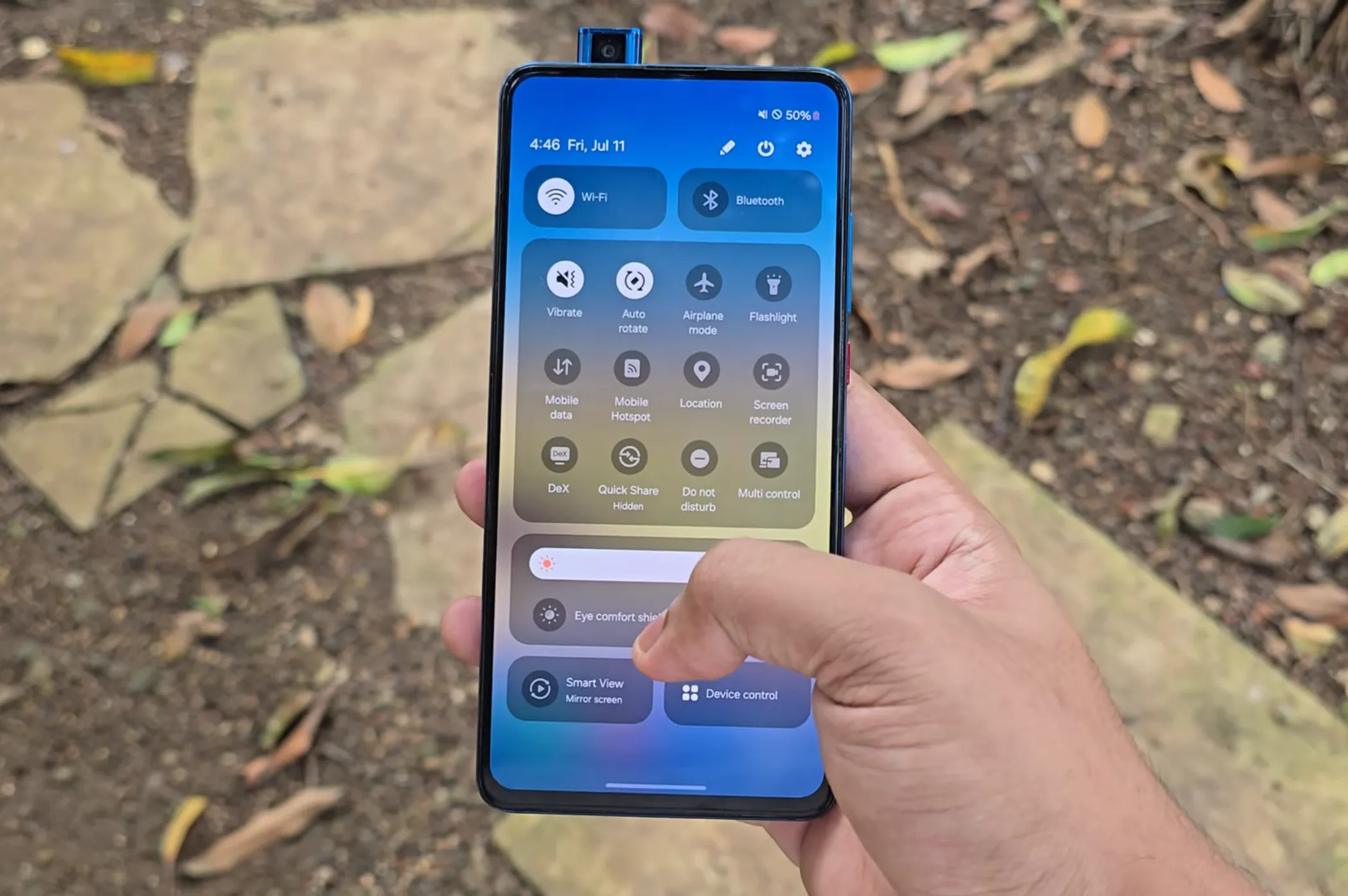
If you’ve ever wished your Redmi K20 Pro / Mi 9T Pro could feel like a brand-new Samsung Galaxy, today’s your lucky day.
Thanks to the magic of Android modding, you can now run Samsung’s One UI 6.1.1 yes, the very same one from the Galaxy S23 (Snapdragon Global model) right on your K20 Pro.
That’s right: a 2019 Xiaomi flagship killer now rocking Samsung’s software skin. Pretty wild, isn’t it?
Why This Is So Cool
One UI has always been about smooth animations, a clean look, and thoughtful little touches that make your phone feel premium. With this port, you’ll get that same flagship Samsung vibe on your trusty K20 Pro.
The updated notification shade, fresh lock screen tweaks, polished transitions everything that makes One UI 6.1.1 special is here. It’s almost like giving your old phone a complete makeover.
But Let’s Be Real – The Bugs
This is still an early port, so not everything works perfectly yet. Here’s what you should know before you jump in:
- Bluetooth finds devices but crashes when you try to connect.
- Fingerprint & Face Unlock aren’t working right now.
- DeX mode doesn’t run.
- Flash toggle only works inside apps like GCam.
- Navigation bar can be fixed by switching to swipe gestures, then back to buttons.
- NFC seems broken on some models (raphael).
- Popup camera only works if you’re rooted and using a special app.
- Screen lock → Only pattern lock works safely. If you set PIN/Password, it still reads as pattern and could lock you out.
So yeah it’s not perfect yet, but it’s still a pretty amazing peek at what your K20 Pro can do.
How to Get One UI 6.1.1 Running on K20 Pro
The devs made it pretty simple thanks to the DSU package method. Here’s the quick version:
- Make sure you’re already on a dynamic HyperOS ROM with a permissive kernel.
- Download the One UI 6.1.1 DSU package (link below).
- Use the DSU Sideloader app to install it.
- Reboot, and enjoy your phone’s brand-new Samsung look.
That’s it you’ve basically turned your K20 Pro into a Galaxy S23 (well, at least on the software side 😉).
📥 Downloads
- One UI 6.1.1 ROM (DSU Package) → Download Here
- DSU Sideloader App → Get It Here
- Popup Camera App (root only) → Download Here
Final Thoughts
Seeing One UI 6.1.1 running on a Redmi K20 Pro is a perfect reminder of why the Android community is the best. Even years after launch, this phone keeps getting exciting new tricks, thanks to devs who refuse to let it die.
Sure, there are some bugs to iron out, but if you’re the type who loves experimenting and breathing new life into older devices, this port is absolutely worth a try.
Your K20 Pro just got a second life as a Galaxy S23 clone, and honestly, that’s the kind of crossover I never thought I’d see.
By @durmiss and @CMLDaModder
Big thanks to:
-@CMLDaModder for building a lot of the stuff
-@AlexFurina for proper audio fix
-@yagzie for “refresh rate” fix
-@Cornshiba for helping to translate the popup motor app
-@Eylemu for telling how to do logs 🙂